[PROJECT FILE] Contract / Unity / Multi-user VR

Gear’n Air

A multi-user VR training application for learning gearbox assembly, pneumatic systems, diagnostics, and instructor-led technical exercises.

FOCUS
Senior Unity Developer · Contractor
LATEST CONTRIBUTION
TECHNOLOGIES
Unity / C# / Multi-user VR
PROJECT INDEX
01 / 10
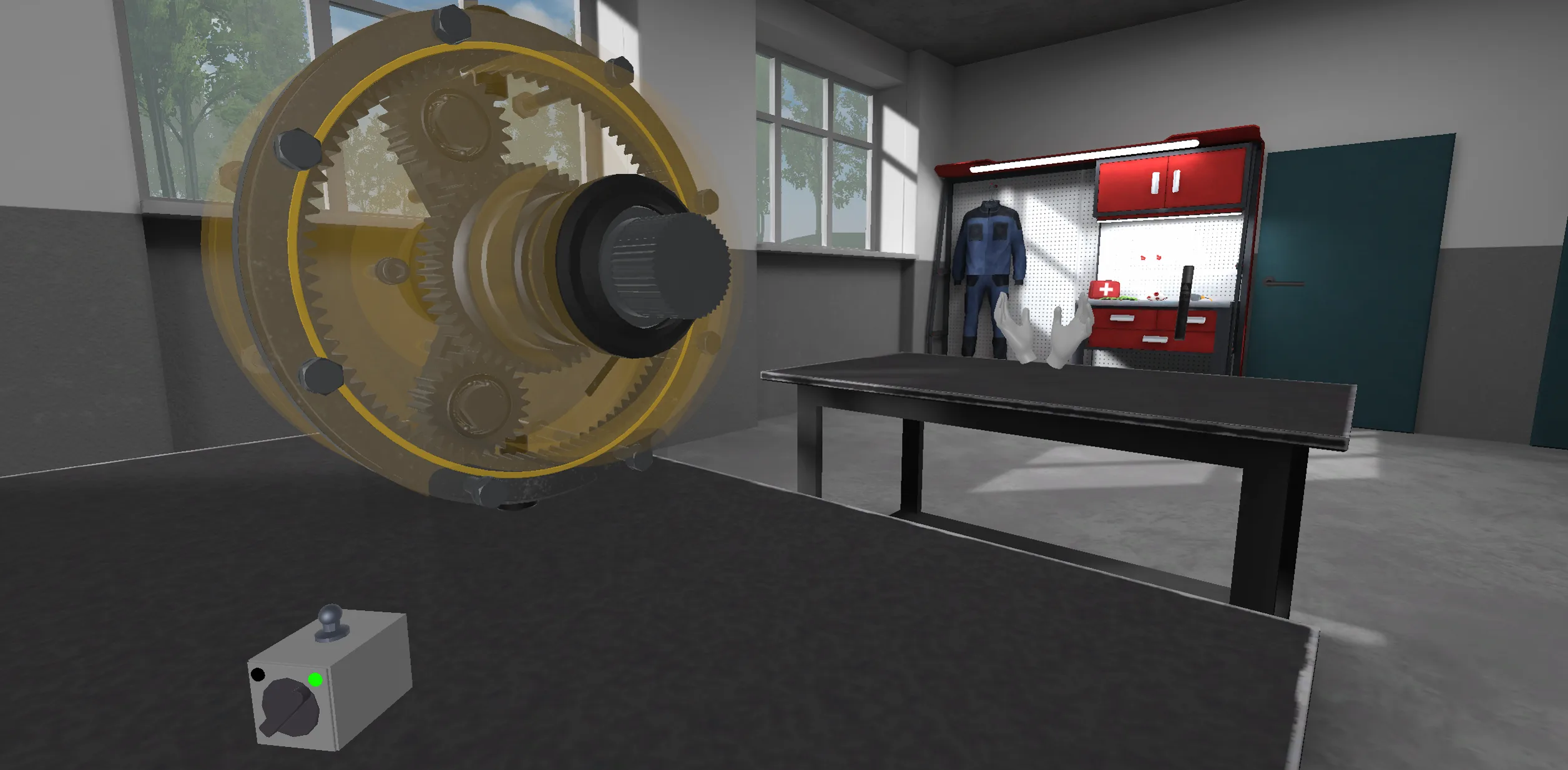
A transparent planetary gearbox in a virtual technical workshop, revealing its internal gears and shafts.Open gallery
Gear’n Air — project visual

[01] Project overview

Making mechanical systems learnable through shared VR practice.

Gear’n Air is a VR technical-training application for high-school students. It presents mechanical transmission and pneumatic-system exercises in a shared workshop, where students can work together with teacher support.

As a Senior Unity Developer on a project-based contract, I worked on the application from March to May 2026. I built the reusable assembly system and its networked runtime, then applied it across the transmission and pneumatics training content.

The work combined guided and free-learning scenarios with concrete mechanical feedback: learners can inspect equipment, place and remove parts, follow valid assembly order, work with tools, operate animations, and use diagnostic equipment.

[02] Technical deep dive

// UNDER THE HOOD

A configurable assembly system for shared technical training.

I developed an assembly framework around configurable parts, slots, tools, states, conditions, and validation rules. This gave the training content a shared foundation for placing components, enforcing dependencies, guiding the next action, and communicating successful or failed state changes without hard-wiring each exercise into a separate interaction flow.

I extended the runtime for multi-user sessions, synchronizing part operations and device state so a group could work with the same training setup. Later work added synchronized mechanism animations and a control box, keeping presentation and required-animation scenarios aligned for connected participants.

The content layer used that system for conical, planetary, spur, and worm gearboxes, then for five pneumatic assemblies with configured parts, hoses, and blocking rules. I also integrated a magnetometer training tool across the gearbox scenarios and refined hand-tracking selection behavior.
[03] Tech stack & skills

Tools and disciplines behind the project.

[04] Personal contribution

// 01

Configurable assembly-system foundation

Built the core runtime for assembly exercises, covering parts, slots, component state, scenarios, interaction flow, tool selection, operation conditions, and placement validation. The system made mechanical dependencies and permitted actions configurable per training setup.

  • Unity
  • C#
  • Training simulations
  • State machines
  • Validation logic
  • Data-driven design
// 02

Multi-user state & interaction synchronization

Developed the networked assembly runtime for sharing part operations, device state, and interaction outcomes across a session. Extended the system so mechanism animations and their controls could stay synchronized during collaborative training.

  • Multi-user VR
  • Network synchronization
  • Event-driven programming
  • Runtime state management
// 03

Transmission training content

Configured interactive training content for conical, planetary, spur, and worm gearboxes: parts, prefabs, assembly and disassembly dependencies, scenario setup, material states, and presentation animations.

  • Technical simulation
  • Prefab workflows
  • Scenario configuration
  • Animation systems
  • Material configuration
// 04

Pneumatics assemblies & scenarios

Implemented and refined five pneumatic assemblies, including their definitions, component prefabs, hose behavior, blocking rules, and learning scenarios. Added free-learning and presentation paths alongside guided exercises.

  • Pneumatic systems
  • Interactive 3D
  • Scenario design
  • Configuration workflows
  • VR training
// 05

Diagnostic and VR interaction tools

Added the magnetometer tool and its gearbox-specific placements and animations, refined tool and selection interaction, and updated hand-tracking input so selecting parts remained usable in the training workflow.

  • VR interaction
  • Hand tracking
  • XR Interaction Toolkit
  • Diagnostic tools
  • Interaction design